iPhone Lock Screen Size: Wallpaper Pixels by Model (2026)
iPhone lock screen size in pixels for every model from iPhone 12 to 18 Pro Max, how much iOS crops from a 4K original, and real file weights, updated for 2026.
By the Velpaper team · Wallpapers by Carlos Vivero, Velpaper designer · · Updated · 7 min read
In short: The iPhone lock screen size is the native screen resolution: 1320 × 2868 pixels on iPhone 18 Pro Max, 1206 × 2622 on iPhone 18 Pro and 17, and 1290 × 2796 on iPhone 15 Pro Max and 14 Pro Max. One 2160 × 3840 image is larger than every model, so iOS only scales it down and trims about 9% from each side.
Wallpapers


Free originals for iPhone and Android, no watermark
On this page
The iPhone lock screen size is the native screen resolution: 1320 × 2868 pixels on iPhone 18 Pro Max, 17 Pro Max and 16 Pro Max, 1206 × 2622 on iPhone 18 Pro, 17 Pro and 17, and 1290 × 2796 on iPhone 15 Pro Max and 14 Pro Max. The lock screen and the home screen use the same pixel size, so one wallpaper file serves both. A single 2160 × 3840 image (vertical 4K, 9:16) is larger than every iPhone screen: iOS scales it down by 0.66 to 0.75 and trims about 9% of the width on each side. Below are the sizes for every model from iPhone 12 to iPhone 18 Pro Max, our crop calculation and real file weights from the Velpaper catalog.
Updated 14 October 2026. iPhone 18 Pro and 18 Pro Max resolutions checked that day on apple.com; earlier models from Apple's tech specs pages.
Terms used on this page
- Resolution: the number of pixels across and down the screen, for example 1206 × 2622.
- Aspect ratio: height to width. A 2160 × 3840 file is 16:9 stood upright; recent iPhones are about 19.5:9.
- Scale: how much iOS shrinks the image so its height matches the screen.
- Crop: the part of the image width that falls outside the screen.
iPhone lock screen size by model
| Model | Lock screen and wallpaper size (pixels) | Aspect ratio |
|---|---|---|
| iPhone 18 Pro Max, 17 Pro Max, 16 Pro Max | 1320 × 2868 | 19.5:9 |
| iPhone 18 Pro, 17 Pro, 17, 16 Pro | 1206 × 2622 | 19.5:9 |
| iPhone Air | 1260 × 2736 | 19.5:9 |
| iPhone 16 Plus, 15 Pro Max, 15 Plus, 14 Pro Max | 1290 × 2796 | 19.5:9 |
| iPhone 16, 15 Pro, 15, 14 Pro | 1179 × 2556 | 19.5:9 |
| iPhone 14 Plus, 13 Pro Max, 12 Pro Max | 1284 × 2778 | 19.5:9 |
| iPhone 17e, 16e, 14, 13, 13 Pro, 12, 12 Pro | 1170 × 2532 | 19.5:9 |
| iPhone 13 mini, 12 mini | 1080 × 2340 | 19.5:9 |
| iPhone SE (3rd generation) | 750 × 1334 | 16:9 |
Sources: iPhone 18 Pro tech specs on apple.com (2622 by 1206 and 2868 by 1320 pixels at 460 ppi) and the iPhone tech specs archive on Apple Support. Not sure which model you have? Apple's Identify your iPhone model page lists them by model number. Wallpapers matched to the 2025 colours are in iPhone 17 wallpapers.
How much iOS crops from a 2160 × 3840 original
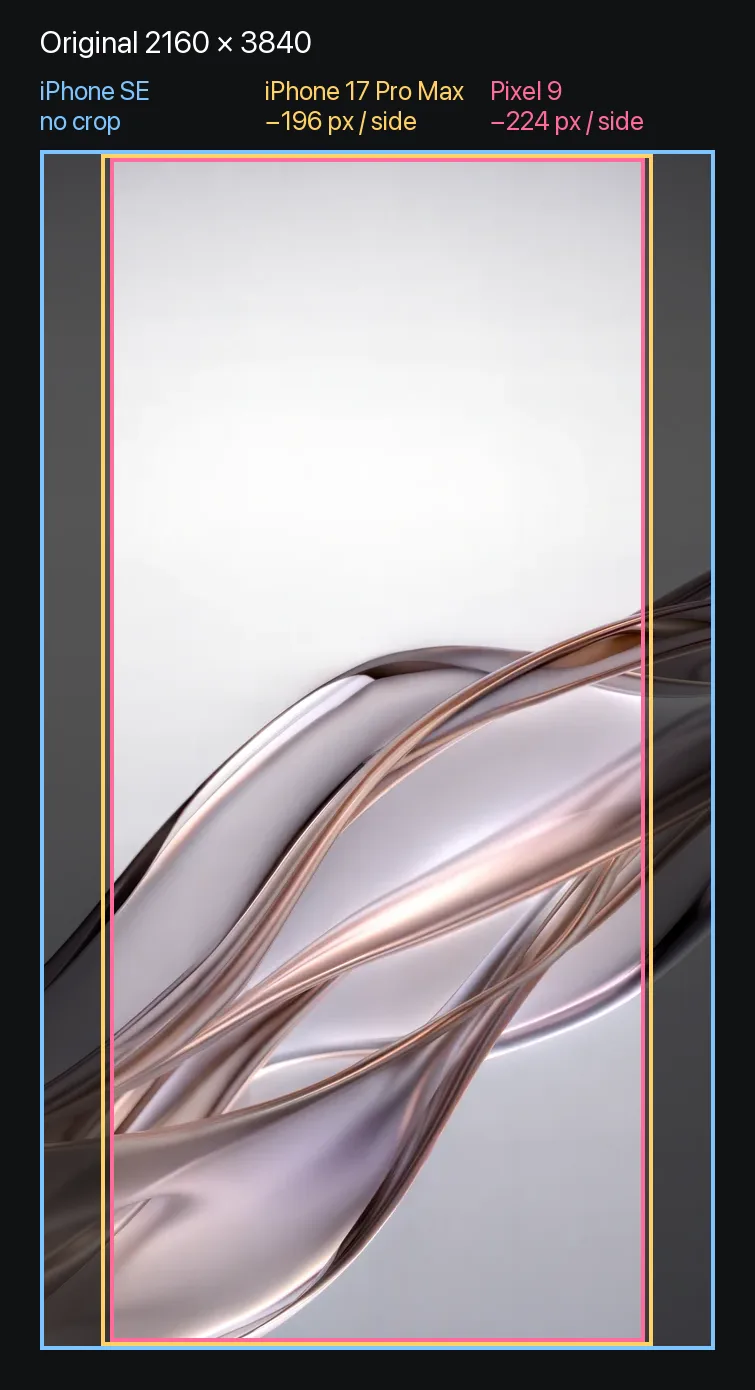
Method. iOS fills the screen by height and centres the image. Scale = screen height / 3840. Visible width = screen width / scale. The rest is split between the two sides. Example, iPhone 18 Pro Max: 2868 / 3840 = 0.75; 1320 / 0.75 = 1767 pixels visible; (2160 minus 1767) / 2 = 196 pixels trimmed per side.
| Model | Scale | Visible width of the original | Trimmed per side |
|---|---|---|---|
| iPhone 18 Pro Max, 17 Pro Max, 16 Pro Max | 0.75 | 1767 px | 196 px (9.1%) |
| iPhone 18 Pro, 17 Pro, 17, 16 Pro | 0.68 | 1766 px | 197 px (9.1%) |
| iPhone Air | 0.71 | 1768 px | 196 px (9.1%) |
| iPhone 16 Plus, 15 Pro Max, 14 Pro Max | 0.73 | 1772 px | 194 px (9.0%) |
| iPhone 16, 15 Pro, 15, 14 Pro | 0.67 | 1771 px | 194 px (9.0%) |
| iPhone 14 Plus, 13 Pro Max, 12 Pro Max | 0.72 | 1775 px | 193 px (8.9%) |
| iPhone 17e, 16e, 14, 13, 12 | 0.66 | 1774 px | 193 px (8.9%) |
| iPhone 13 mini, 12 mini | 0.61 | 1772 px | 194 px (9.0%) |
| iPhone SE (3rd generation) | 0.35 | 2159 px | 1 px (0%) |
- Every iPhone except the SE loses the same strip: 193 to 197 pixels, about 9% of the width, on each side.
- The SE is exactly 16:9 and shows the whole frame.
- The middle 1766 pixels of 2160 are visible on every model. Keep the subject inside that band.
This is the minimum crop. Zooming with two fingers in the wallpaper editor cuts more. If a wallpaper looks enlarged after you set it, the fixes are in iPhone wallpaper zoomed in.
Velpaper catalog data: real size and weight of originals
Every Velpaper wallpaper is a 4K original: phone wallpapers are 2160 × 3840, desktop wallpapers are 3840 × 2160 and some are 5120 × 2880. On 14 October 2026 we measured the files you get when you download.
| Measure | Value |
|---|---|
| Phone originals | 2160 × 3840 (4K) |
| Median and mean JPEG weight at 2160 × 3840 | 0.61 MB and 0.75 MB |
| Lightest and heaviest file | 0.10 MB and 3.04 MB (Tidal Quiet) |
| Phone files under 2 MB | Almost all |
| Desktop originals | 3840 × 2160 (4K), some 5120 × 2880 (5K) |
| Site preview versus original | WebP 675 × 1200: 40 KB for Liquid Light (original 1.32 MB) |
| Most downloaded phone wallpapers | Liquid Light, Tidal Quiet, Blue Hour |
A vertical 4K wallpaper costs almost no storage: half of our originals weigh under 0.61 MB. Smooth gradients compress well, while the fine water texture in Tidal Quiet weighs more. The 675 × 1200 preview is smaller than any iPhone screen in the tables, even the SE, so set the original, not a saved preview.
All five above are 2160 × 3840 originals. Electric Violet Arch comes from the arch wallpaper collection, where all twelve phone files share this size.
How to find your size and fit any image
- Find the model. Open Settings, General, About and read the Model Name.
- Check the real pixels with a screenshot. A screenshot is exactly the screen resolution. Open it in Photos and swipe up, or tap the info button: the size shows under the date.
- Crop to 9:16. In Photos tap Edit, then Crop, then the aspect button, and pick 16:9 in portrait orientation.
- Keep quality. Save high quality JPEG for illustrations and PNG for graphics with text. Do not resend it through a messenger.
- Set it and frame it. Settings, Wallpaper, Add New Wallpaper, Photos. Pinch to place the subject below the clock, then tap Add. The full walkthrough with clock styles and widgets is in how to set a lock screen wallpaper on iPhone; Apple's own steps are on Change your iPhone wallpaper.
Safe zones. The clock and lock screen widgets take the top third, the Dynamic Island covers the top centre, and the flashlight and camera buttons sit in the bottom corners. Put the main subject just below the middle.
The dpi myth. 72 or 300 dpi in the file properties changes nothing on a phone. The screen only counts pixels.
Why 1080 × 1920, screenshots and messenger copies look soft
A 1080 × 1920 file has to be enlarged 1.32 times on iPhone 14 and 17e, 1.33 times on iPhone 16, 1.37 times on iPhone 17 and 1.49 times on iPhone 18 Pro Max. A screenshot is exactly screen size with nothing to spare, so any crop stretches it. Messengers recompress photos and shrink the long side below 4K, which brings banding on gradients and blocky dark areas on OLED. Send wallpapers as a file, not as a photo.
Android, iPad and desktop sizes
Android screens are narrower: Galaxy S25 Ultra is 1440 × 3120 and Pixel 11 Pro XL is 1344 × 2992. The same 2160 × 3840 original covers them with a slightly bigger side crop, up to 10.4% on Pixel; the full table is in the Android wallpaper size guide. Desktops need a wide frame: 3840 × 2160 for 4K displays and 5120 × 2880 for 5K, and Velpaper composes those separately rather than cutting them from a phone image.
Sources and method
- Screen resolutions: apple.com specs for iPhone 18 Pro and 18 Pro Max, Apple Support tech specs for earlier models, checked 14 October 2026.
- Crop: the formula above; you can rerun it for any screen from its width and height.
- File weights: width, height and byte size of every original in the Velpaper catalog on 14 October 2026; 1 MB = 1,000,000 bytes.
Spotted a mismatch with Apple's specs? Write to [email protected] and we will recheck the table.
What to do next
- Find your model in the crop table and note how much is trimmed per side.
- Download a 2160 × 3840 original, for example Liquid Light, the most downloaded Velpaper wallpaper.
- Set it with Settings, Wallpaper, Add New Wallpaper and keep the subject in the middle band.
Original wallpapers in and for iPhone, Android and desktop.
Questions
What is the iPhone lock screen size?
The lock screen uses the native screen resolution, the same as the home screen. It is 1320 × 2868 pixels on iPhone 18 Pro Max, 17 Pro Max and 16 Pro Max, 1206 × 2622 on iPhone 18 Pro, 17 Pro and 17, 1260 × 2736 on iPhone Air and 1170 × 2532 on iPhone 17e, 16e and 14. The iPhone SE (3rd generation) is 750 × 1334. You do not need one file per model: a 2160 × 3840 image is larger than all of them, and iOS scales it down and trims about 9% on each side.
What size is an iPhone 14 Pro Max, 15 Pro Max or 13 Pro Max wallpaper?
The iPhone 14 Pro Max and 15 Pro Max share a 1290 × 2796 pixel screen, the same as the iPhone 16 Plus and 15 Plus. The iPhone 13 Pro Max is 1284 × 2778, like the iPhone 14 Plus and 12 Pro Max. The iPhone 14 is 1170 × 2532. A 2160 × 3840 original covers all of these: on a 14 Pro Max or 15 Pro Max iOS shrinks it to 0.73 of its size and trims 194 pixels per side; on a 13 Pro Max the trim is 193 pixels.
Is 1080 × 1920 enough for an iPhone wallpaper?
Only for the iPhone SE. A 1080 × 1920 image is Full HD in a 9:16 frame and is smaller than the screen of every iPhone from the iPhone 12 onward. To fill the screen iOS enlarges it 1.32 times on iPhone 14 and 17e and 1.49 times on iPhone 18 Pro Max, and enlarged images look soft on fine lines and text. For a sharp lock screen on a current iPhone start from 2160 × 3840, which iOS only ever scales down.
How big is a 2160 × 3840 wallpaper file?
Smaller than most people expect. In the Velpaper catalog on 14 October 2026 the median 2160 × 3840 JPEG weighed 0.61 MB and the mean 0.75 MB, and almost every phone file was under 2 MB. The heaviest, Tidal Quiet with its fine water texture, is 3.04 MB. When you set a wallpaper iOS keeps its own copy for the screen, so shrinking the file to save space gains almost nothing and costs visible sharpness.
Why does iOS crop or zoom my wallpaper?
Because the image and the screen have different shapes. Recent iPhones are about 19.5:9, narrower than the 9:16 frame of a 4K wallpaper. When iOS fills the screen height, the extra width falls outside: 193 to 197 pixels per side of a 2160 × 3840 original, about 9% of the width. The SE is exactly 16:9 and shows the full frame. Pinch and drag with two fingers in the wallpaper editor to choose what stays in view.
Where can I get 4K iPhone wallpaper originals?
Velpaper publishes its own wallpapers, and every one is a 4K original: phone originals are 2160 × 3840 JPEG files without a watermark, in the iPhone and Android apps and on velpaper.com. Browsing and previewing are free. Most phone wallpapers unlock after a short optional ad in the apps; on the website, if no ad is available, the original downloads for free. There is no account and no subscription. Desktop versions are 3840 × 2160, and some are 5120 × 2880.
Carlos Vivero
Designer of Velpaper wallpapers
Carlos Vivero designs the wallpapers in Velpaper: quiet architecture, liquid glass, Japanese ink and calm landscapes. Every piece is made as a original for iPhone, Android and desktop.
Recent work